Data Visualization

Visualizing Time with the Double-Time Bar Chart

In my last post I described some of the issues with visualizing cyclical data by hour of day and covered a few examples of different visualization methods that are typically used. This post is more a visualization experiment.

The Context

To start with a little context, for my day job I create a software product called SpatialKey, which is a business intelligence/data visualization tool. We can visualize all sorts of data all sorts of ways, but one of the things we do is show you a histogram of the occurrence of your data by the hour of day. The chart looks something like this:


The Problem

That’s about as simple as you can get, with a single series of data displayed as a bar chart. The section on line charts in my previous post covered some of the problems with these visualizations. I have two issues with this chart:

  • the break in the data between 11pm and midnight
  • the difficulty understanding the context of the time

To summarize, the first problem has to do with being able to understand the trends that occur around midnight (where this chart breaks the data). In this example we can see that data in the evening peaks at 9pm and then declines, but it’s difficult to accurately assess that declining pattern because you have to try to follow the data as it ends on the right edge of the chart and then continues all the way over on the left edge. This is only problematic when something interesting is happening around midnight (or whenever you choose to have your chart begin/end).

The second point about context has to do with the fact that I don’t think about my days as starting at midnight and ending at 11:59pm. A more accurate representation of how I think of my days is that they start sometime when I wake up, usually around 7am, and they are broken up into “day-time” and “night-time”, and they end more or less when I go to sleep. Within “day-time” my day is broken up into other categorizations, like “working hours”, “afternoon”, “lunch-time”, etc. And depending on the data in question, these contextual relationships might be incredibly important. For this post I’ll be looking at crime data. When you’re investigating crime data, the contextual relationship to the time of day can be incredibly relevant. I don’t just want to know about when people are assaulted, I want to know the rate of assaults on the street when I’m going to be walking on the street (typically right after work on my way home, or later at night going out to dinner, bars, etc).

The simple bar chart doesn’t solve these problems well. It presents a hard break in the data, forcing the viewer to mentally connect the end of the chart with the beginning. And it also forces the viewer to think about the days in the context of midnight – 11pm, which is not the natural categorization system we have for the hours of the day.

The Double-Time Bar Chart

My first attempt to address some of these problems is something I’m tentatively calling the Double-Time Bar Chart. The goal is to put the time in context a bit more for the viewer, and to always show a relevant, continuous visualization of all times of the day.

The chart still uses simple bars in a linear chart. But the data is actually shown twice in the chart. The top part of the chart is the exact same histogram chart with 24 bars that we had before, going from midnight to 11pm. The bottom part is the same data (upside down), but it starts instead at noon and goes to 11am. It’s shifted by 12 hours compared to the top chart. Imagine taking the top chart, flipping it upside down, then shifting it over to the right by 12 bars.

There’s a single x-axis for both the top and bottom charts, which is labelled with the hours of the day. But the hours are either AM for the top chart or PM for the bottom chart.

The highlighted regions represent 6am-5pm on the top and 6pm-5am on the bottom. That means there are 24 highlighted bars, so the highlighted bars represent one unduplicated set of 24 hours of data. The highlight is used to draw attention to day-time and night-time activities. A very rough color categorization is used to color 6am-5pm in a lighter yellow, representing day-time, and 6pm-5am in a darker color, representing night. I realize this doesn’t match up with actual sunlight/darkness times in most cities, but I think the 6am-6pm time range is close enough to how many people think about “day” vs “night” that it works.

The duplicated (but shifted) data in the top and bottom allows me to see a continuous, unbroken series of data that can show day-time activity (top) or night-time activity (bottom). There is no hour of the day that forces me to read the chart to the end and then continue on by moving my attention back to the beginning. If I’m interested in the trends during the day (say around lunchtime, so 11am-1pm) then I can read the top chart. But if I’m interested in night-time activity (say 11pm-1am) then I can read the bottom chart. In both cases I get a continuous chart that shows the full context of all the data around the range in which I’m interested.

The highlighted regions serve to draw attention to daytime versus nighttime, but we still keep the rest of the 24 hours visible in each chart (the unhighlighted bars) so you can always get the full context of the data. This allows you to follow the data from 4pm-8pm without forcing your eyes to jump from the top to the bottom.

Examples

For these examples I’ll be visualizing crime data from the city of San Francisco. I’m using two full years of crime, 2009 and 2010. You can download the crime data yourself if you want to play with it.

One note about these charts: there are no y-axis labels and each chart is relative to itself. I was interested in exploring the problem of visualizing the hourly patterns, not necessarily being able to know exactly how many crimes occurred at a certain hour. The highest bar in each chart does not always mean the same value. It simply means that’s the hour with the most crimes for that particular crime type.

Here’s an example of a crime the has an interesting day-time pattern, burglary. Notice the nice peak right when everyone leaves their homes unguarded as they go off to work.

And here’s a contrasting example of a crime that’s primarily a night-time activity, public intoxication.

Notice the nice nearly-linear build up all the way from about 9am up to the peak at midnight, then the dropoff after 2am (when the bars close in San Francisco).

There are a few crimes that are even more polarized. Arrests for driving under the influence have a nice distribution curve that peaks at midnight.

And prostitution is also primarily a night-time activity in San Francisco. There are two peaks, one just after work around 6-7pm, and then another a bit later in the evening at 11pm.


Small Multiples for Comparison

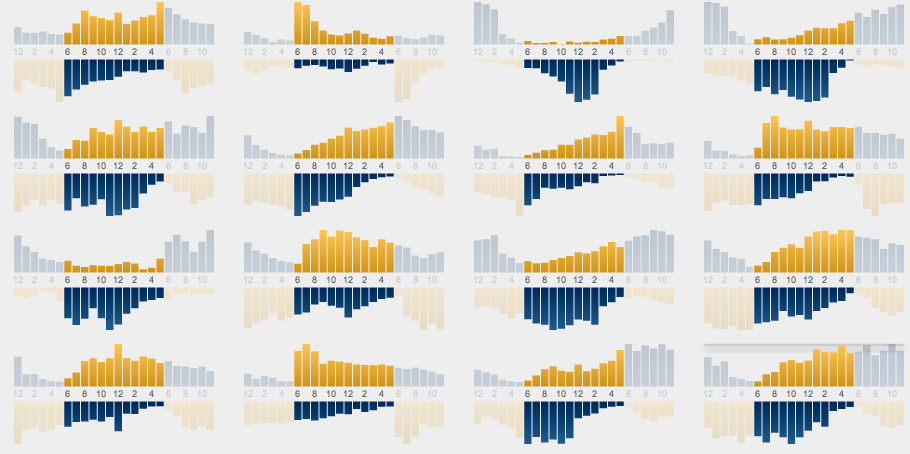
One way to compare different kinds of data is to use small multiples, which relies on small charts all laid out together to make it easy for your eyes to scan. These Double-Time charts work well in small multiples because you can quickly scan to see the difference between predominantly daytime crimes (large yellow areas in the top half) versus night-time crimes (blue areas in the bottom half). For instance, to get a better view of burglary, we can look at the sub-categorizations.

We can see that residential burglaries occur in the morning when people leave for work, whereas burglaries of a store are either late-afternoon or evening crimes.

The same approach can be used to compare many different types of crimes:

Or we can remove the x-axis and strip down the extra whitespace in the charts to get an even more compact view:


Summary/Revisiting the Goals

Now to circle back around to what I was trying to accomplish with this type of chart. There were two main goals: preserving the continuity of the data and putting the data into the context of your day.

To preserve continuity I’ve duplicated the data, which allows for a nice continuous linear chart that covers any important time range. If you’re interested in day-time trends you can look at the top chart. If you’re interested in night-time trends you can look at the bottom chart. But in either case you get a full, continuous range to put the trend in context.

To further put the data in context I’ve added some simple coloring to highlight the day-time vs night-time ranges. The x-axis labels (showing 6am, noon, 6pm, etc) give you some further context that helps you categorize the data. If you split the chart in quadrants you get rough categories for morning (top-left), afternoon (top-right), evening (bottom-left) and night (bottom-right).


The Big Caveat

This is just a simple design experiment. I’m making no claims about the efficacy of this chart. I have not run any studies to validate that this chart is clear to viewers or is any better (or worse) than any other visualization. I don’t even know if I myself think this is an effective chart. I’m just trying to spur a bit of a discussion and some experimentation around the problem of visualizing cyclical hourly data. So what do you think?

I’ll be posting another (even more experimental) take on this same topic shortly.

Standard
Data Visualization

Visualizing Cyclical Time – Hour of Day Charts

I’ve been mulling over a problem in my head for the past few days. How do you represent the hourly trends in data? More specifically, I’m talking about taking something like a whole year of crime records and showing the hourly trends of each type of crime, so you can see which crimes happen mostly in the mornings and which ones happen when the bars close. I haven’t yet found a solution I’m happy with.

A Multi-Part Mini-Series All About Time

This is the first part of a few blog posts on this topic. Apologies ahead of time if you don’t find the topic of visualizing the 24 hours of the day as fascinating as I do, but I’m going to take the time to fully geek out and focus in on this very specific problem in depth.

This is Part 1: Explaining the Challenge and Reviewing the Status Quo. This is sort of like a lit review; it’s my attempt to consolidate everything I can find about how people are currently representing 24-hour cyclical data.

Challenge: Continuity

The 24 hours of the day are a continuous cycle. The “day” doesn’t end at any arbitrary time. A normal single day ends at 11:59pm, but that’s just an imaginary line. When you’re talking about a generalized 24 hours, 11:59pm leads straight into midnight, which continues on to 1am. And sometimes the most interesting trends are in those hours on either side of midnight.

Many line or bar charts that deal with the 24-hour cycle simply pick a point at which the chart starts and ends. Sometimes the charts go from 12am-12am, sometimes they use ranges like 4am-4am (which puts the break during a time when most people are sleeping). For specific data this is often acceptable, but in general I find it to be a big limitation.

Challenge: Personal Context

We all have our daily routines. I wake up around 7:15, start work at 8, walk outside to get lunch around 12:30. For most people there’s a period in the morning and early evening when you’re coming and going from your home on the way to work. These moments bracket out experiences with time. We think about the day split into these chunks. Did something happen during the work day (roughly 8-5), or was it in the evening (roughly 5-8), or was it at night (9-12)? I think it’s safe to say that most people have a common notion of what morning, afternoon, evening, and night mean (even if those definitions vary a bit person to person). And each of us makes a mental organization of those time periods based on our own habits. When visualizing hourly trends I want to give people something they can relate to in the context of their daily schedules.

These issues aren’t easy to solve, and I’m reminded of a fantastic quote from the movie Closer:

Time, what a tricky little fucker.

Tricky, indeed.

Of course when it comes to visualizing the 24-hour cycle there are many more challenges than the few I’ve listed, but most of the other challenges fall into the general bucket of data visualization (as opposed to being very specific to the 24-hour cycle). Things like being able to accurately compare values against each other or being able to understand the chart without getting lost in confusion are things that are critical in all forms of data visualization.

Line Charts

One of the easiest methods of displaying data by hour of day is in a simple line series or bar chart. Typically these charts begin at a certain hour (often midnight) and show 24 unique bars or data points, ending at the same time they started. An example of this type of line chart is the following figure, taken from The 24 Hour Society.

This chart shows the percentage of people shopping at any given time of the day:

That chart goes from midnight to 11pm, which works great for showing the trend for an activity like shopping (which occurs during the day). But the choice of the x-axis range isn’t as nice when looking at an activity where the important trend period includes midnight.

Here’s another chart from the same publication that shows when people are sleeping:

In that case the interesting time period that we want to focus on is around 9pm – 7am, when people are going to sleep and waking up. But with an x-axis that starts at midnight we end up breaking the data directly in the middle of the interesting period.

Another example from the New York Times analyzes similar data about the typical activities that people perform throughout the day.

The NYT chart starts at 4am instead of midnight, which does a bit of a better job showing the trend of when people go to sleep than an x-axis that starts at midnight. The 4am-4am axis does a good job at showing activities during the day (which is what it was designed to do). Luckily there aren’t many activities that people do that cross over that 4am break (other than sleeping). But what if there was an interesting trend we wanted to highlight that did span 4am?

The biggest problem I have with these charts is continuity. As a general visualization tool, how can you pick an arbitrary time to break the data? How are you sure the most interesting part of the data doesn’t overlap when the chart begins and ends?

Circular Charts

The problem of continuity that line charts have can often be overcome by using some form of circular chart. The cyclical nature of the 24-hour day lends itself well to a circular representation. There are a few different methods typically used to visualize the 24 hour cycle. Some charts use a 12 hour circle, which mimics the display of an analog clock. Others display a full 24 hour circle.

12 Hour Clocks

It’s often tempting to use analogies to the real world, especially when visualizing time. Everyone is used to reading the hands of an analog clock. At a glance we all know what each of the 12 numbers on the clock face mean, and we already have built in associations with the spatial layout. The big problem with using the metaphor of a clock is that a clock face is only broken up into 12 hours, which means that you can only show half your data at a time (or you need to somehow layer two series on top of each other).

2 Clocks

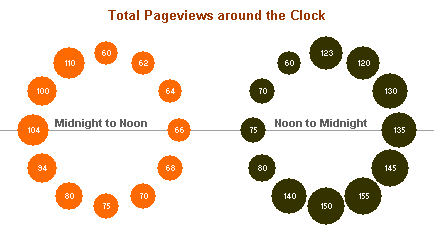
One attempt at solving the problem of the 12 hour clock is to use two of them, since with two clocks you now have enough space to show all 24 hours. Here’s an example by Purna Duggirala that is essentailly a bubble chart that uses two clocks side by side.

The biggest problem with the chart is the incorrect continuity. A single clock on its own isn’t a continuous range, it’s really only half a range. So the clock on the left is showing 12am – 12pm, but when you reach the end of the circle the data doesn’t continue on like the representation shows. Instead you need to jump over to the second clock and continue on around. It’s difficult to see the ranges right around both 12pm and 12am, since you lose context in one direction or another (and worse, you get the incorrect context from the bordering bubbles).

Polar Spiral Clock

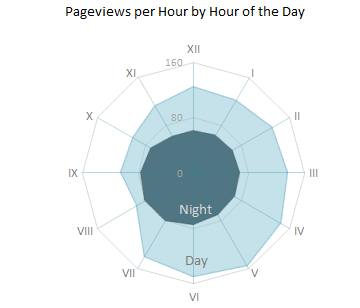
In a great show of Internet collaboration, the double clock chart spurred some other experimentation. Jorge Camos came up with a polar chart that plots the data on a single “clock face,” showing two 12 hour charts overlaid on top of each other.

This then led to another iteration that makes the continuation of the data series clearer. Jon Peltier modified the polar chart to show a line series connecting the hours.

Without experimenting more with this kind of polar chart, I can’t make up my mind about whether it’s effective or not. But I do really like the ingenuity.

24 Hour Circles

Given that the 12-hour clock is a difficult metaphor to use for a visualization, many people choose to use a 24-hour circle. 24-hour circular charts typically start with midnight at the top of the chart and then proceed clockwise, showing all 24 hours in one 360-degree range. The benefit of a 24-hour circular chart is that the cyclical nature of the data is represented and the viewer can easily read the continuity at any point on the chart.

A simple example of a 24-hour circle comes from Stamen Design‘s Crimespotting. This isn’t a data-heavy visualization chart, since it doesn’t actually show any data other than sunrise and sunset times (instead it’s main purpose is as a filtering control). But it’s a good example of the general layout of 24-hour charts, and it’s very clean and well-labeled. You can read about the thinking that went into designing this “time of pie” on Stamen’s blog.

The inspiration for this time selector, which is documented in Tom Carden’s blog post, was the real-life timer control used for automating lights in your house.

If you’ve decided to use a 24-hour circular chart then you’ll need a way to visualize your data. The main methods I’ve found for visualizing data around a circle include sized wedges, colored arcs/wedges, sized bubbles positioned around the chart, or sized spokes. I’ll cover just a few of these (sized wedges and colored arcs).

Wedges

Perhaps the most well-known radial chart that uses differently sized wedges is Florence Nightingale’s coxcomb chart from 1857 that shows the causes of death during the Crimean War.

Nightingale’s chart shows 12 months of data, each wedge corresponds with a single month. The same technique can easily be applied to hourly data as well. Instead of 12 wedges an hourly chart would have 24, but the same general principle applies. Wedges always use the same angles (as opposed to typical pie charts) and modify the radius to size the wedge based on the data.

If you’re thinking about using this type of chart I’d highly recommend reading over this critique that highlights some common problems with the approach.

An alternative take on using wedge size around a circular chart can be found in Antonio Gabaglio’s Storia e Teoria Generale Della Statistica, which was written in 1880. Gabaglio created a few charts that also plotted data by month in a circular fashion. He used a few different wedge orientations:

I haven’t seen this method used to represent data by hour of day, but the same technique could easily apply.

Colored Arcs/Wedges

Another way to represent data around a circle is to use bands of color. An interesting article, Activities, ringmaps and geovisualization of large human movement fields, by Jinfeng Zhao, Pip Forer, and Andrew Harvey explains a data viz approach they call a “Ringmap.” The article itself isn’t freely available, but you can access this condensed version to get the gist, or take a look at this presentation for more good illustrations of the technique.

Here are a few more complex examples of using ringmaps:

Ringmaps can also represent multiple series of data. Comparing multiple series was actually the main intention of the authors. With multiple series the data forms multiple rings, one around the other. That allows for comparison of the same cycle periods between data series. Comparing multiple data series is a bit outside the scope of this article (and god knows this is getting long enough), so I won’t go into detail.


Spirals

Spirals are similar to circular charts, but are used with slightly different data. They don’t really apply directly to the task I’m concerned with in this article, but they’re interesting in their own right and deserve a mention. Like circle charts, spirals are used to represent cyclical data, such as data that occurs over a 24-hour period. But spirals typically show many iterations of the data (ie many series) in a spiral layout. So instead of showing aggregate numbers (ie a single set of numbers showing the total number of occurrences in each hour), a spiral chart might show many individual days worth of data, all in a connected sequence.

Here’s a spiral chart of data tracking sunshine intensity, from the paper Visualizing Time-Series on Spirals by Marc Alexa. By visualizing many individual days worth of data at the same time you can start to identify patterns and find abnormalities.

Here’s one last spiral example, which was published by a fellow Flex developer, Michael VanDaniker. In his paper, Leveraging the Spiral Graph for Transportation System Data Visualization, VanDaniker provides the following example of using a spiral representation to show the pattern of traffic collisions on the different days of the week (and the hours of the day during those days).

Spirals are a bit outside the scope of the problem I’m trying to solve, but since they are used for identifying patterns in periodic data they fall within the same ballpark.

Continuous Circles vs Terminal Lines

One final point I want to make before closing has to do with weighing the benefits of circular visualizations (continuous) over line or bar charts (terminal, since they have a beginning and end). The continuity offered by circular charts makes them seem like a good choice, but it might be worth taking a critical stance when it comes to choosing circular charts versus line or bar charts.

I haven’t been able to find many studies that have examined how effective circular data visualization techniques are over linear ones, but I did come across a dissertation from 2008 by a Stanford Psychology student, Angela Kessell. Kessell’s dissertation, titled Cognitive Methods for Information Visualization: Linear and Cyclical Events, examines how people choose to represent cycles, and finds that in many cases the majority of people draw cyclical data (things like the water cycle, the four seasons, etc) in a linear fashion and not as circles as we might expect.

When we choose to represent cyclical data it might seem like using a circular representation is the most intuitive and obvious choice, but Kessell’s research makes you question whether people’s brains intuitively think of cyclical data in a circular fashion or if they instead think of cyclical data in a linear way. Without jumping to any hard conclusions, I just want to point out the idea that maybe our brains more effectively conceptualize linear representations.


Whew

So that’s my attempt at an exhaustive run-down on the current state of the industry when it comes to visualizing cyclical 24-hour data. If you made it this far, I salute you.

The next parts in this mini-series about time charts will be some experiments that I’ve been working on to try some new ideas for visualizing time data. As a teaser for the upcoming posts, here are some images that I’ll be explaining soon in subsequent posts.

These are coming soon:

Standard
Data Visualization, SpatialKey

Ethics and the use of DUI data

I do a lot of work with San Francisco crime data, and one of the things that I’ve been struggling with is one particular dataset: the locations of all the driving under the influence (DUI) arrests in the city. Just yesterday there was an article about US Senators asking Apple to remove DUI checkpoint applications from the app store.

San Francisco publishes a huge amount of crime data, going all the way back to 2003. You can grab a single CSV file with all the data. Over a million crimes. It’s beautiful.

If you look at just the DUI records you start seeing patterns. Here’s about a thousand DUIs over the past 2 years (2009-2010). Click any of these images for larger versions of the maps.

If we look at a density map individual streets start lighting up. Specific intersections stand out.

Here’s a representation that assigns the number of DUIs to the street segment they occurred on and colors the data like a typical traffic map.

And finally just for fun, here’s a 3D rendering of the same 2 years of data:

It’s compelling data, and fairly easy to tell an interesting story. But is there an ethical issue around visualizing or using this data? There’s a lot that you can do with the data, obviously visualizations like this are just scratching the surface.

An idea that crosses the line

Following one train of thought to its logical conclusion leads me to a mobile app idea. It’s a simple app, essentially just a routing application. You type in where you’re going and you can get directions from your current location, just like any other mapping or GPS routing application. Except we can give you directions that avoid known DUI hotspots. In a very simplified sense, routing algorithms basically give streets a score, usually determined based on factors like speed limit, road size, distance, etc. The path with the lowest score wins, and that’s what you end up getting for your directions. All you’d have to do to route around common DUI locations is make the number of historical DUIs along a street segment count in the routing algorithm’s calculation. Streets with lots of historical DUIs would be avoided in favor of side streets with fewer arrests. You’d avoid Geary Blvd and intersections like 16th St and Mission St.

It’s an easy app and the data is there for the taking. I’ll leave aside the question of whether the idea would work in terms of being effective at making drunk drivers avoid actual arrest. For argument’s sake, let’s assume that it would work, or that some other similar type of app could. It’s not an app I’d build, and I assume pretty much everyone understands the moral objection.

I don’t have any big moral takeaway or conclusion. On the one hand there are arguments that data and knowledge can never inherently be bad. Then there are arguments that this particular data (or at least specifically a DUI-avoiding directions app) would only be used to encourage drunk driving. I’m not going to make the DUI-avoiding mobile app, that goes way too far down the path of encouraging bad behavior. But it brings up a lot of interesting questions we need to think about as we’re working with data like this.

Standard
Maps, SpatialKey

Crime Maps on the Guardian Powered by SpatialKey

I’m happy to announce a new crime mapping application I’ve been working on that just went live on the Guardian DataBlog. The app lets you compare different cities in England to see where crimes of different types are distributed. You can either compare two cities side by side, or two different crime types in the same city. So if you’ve ever wondered which areas of London have high amounts of violent crime but low amounts of burglary, now you can find out.

This custom app was built upon SpatialKey, which made cranking it out only take a matter of days (the whole thing start to finish took about 4 days).

Standard
Art, Maps, SpatialKey

Night Vision Maps of the WikiLeaks Iraq Casualty Data


In 1990 I was an eight year-old kid. And like most eight year-olds I spent a lot of time in front of my TV. But the summer of 1990 was different. Instead of cartoons I was watching the first Gulf War.

The television media coverage of the war was everywhere. Except these weren’t the gruesome images of the Vietnam era. These were images that looked more like videogames. We had cameras attached to bombs that used night vision and targeting scopes as they dove into buildings. All the images were a bit fuzzy, a bit grainy, either tones of gray or green, and overall void of emotion.

But we were watching people die.

The disconnect between the emotionless images shown on TV and the reality that they represented has always stuck with me. The fact that we could (and still do) present something so horrible in such a clinical, disconnected way makes my head spin.

WikiLeaks Iraq data

I’ve been experimenting with mapping the recently released data from WIkileaks that documents deaths in Iraq. All told the data documents 108,365 deaths, which we assume are just a fraction of the true casualty count from this war. Of those deaths, 65,641 were civilians.

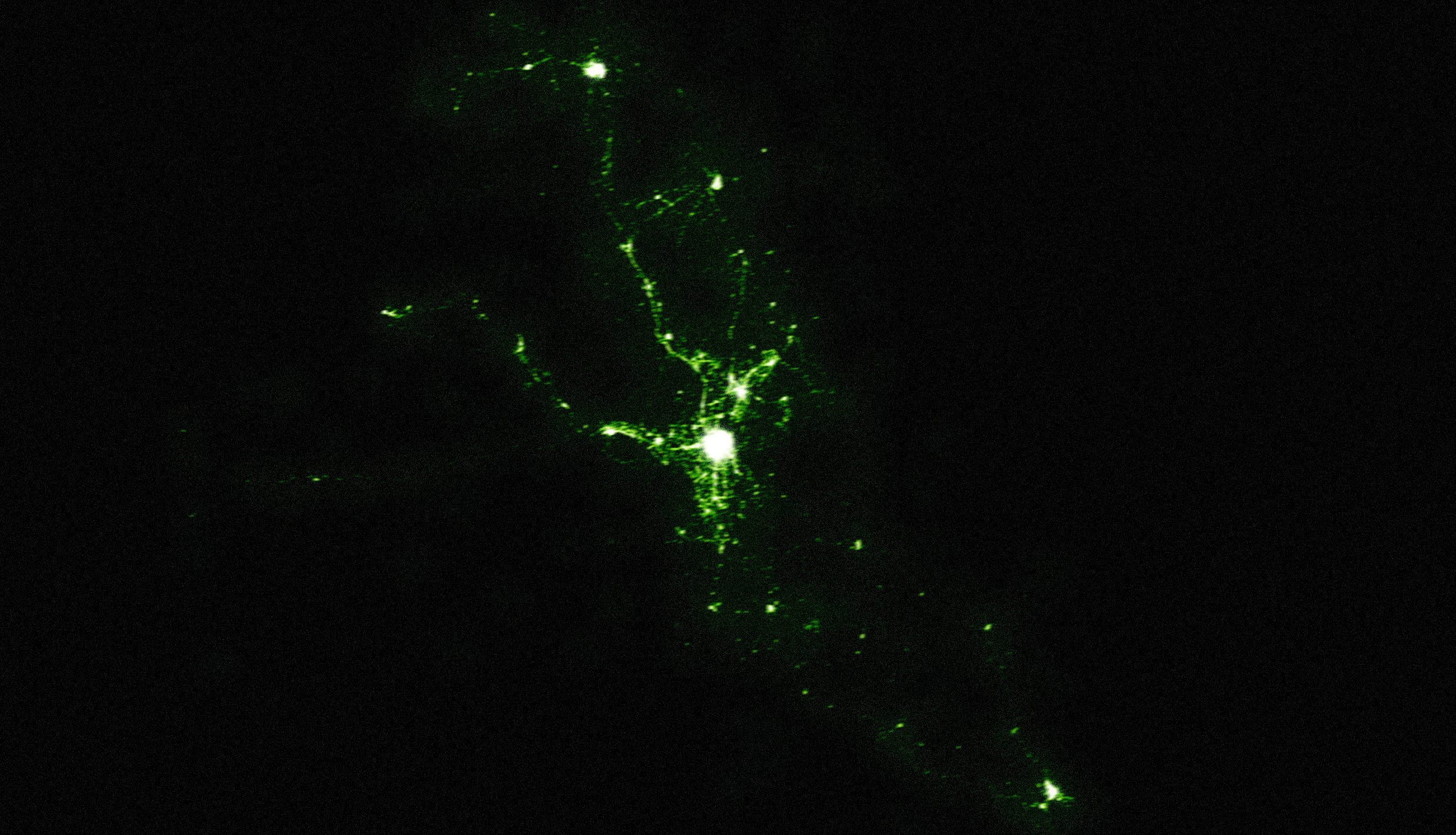
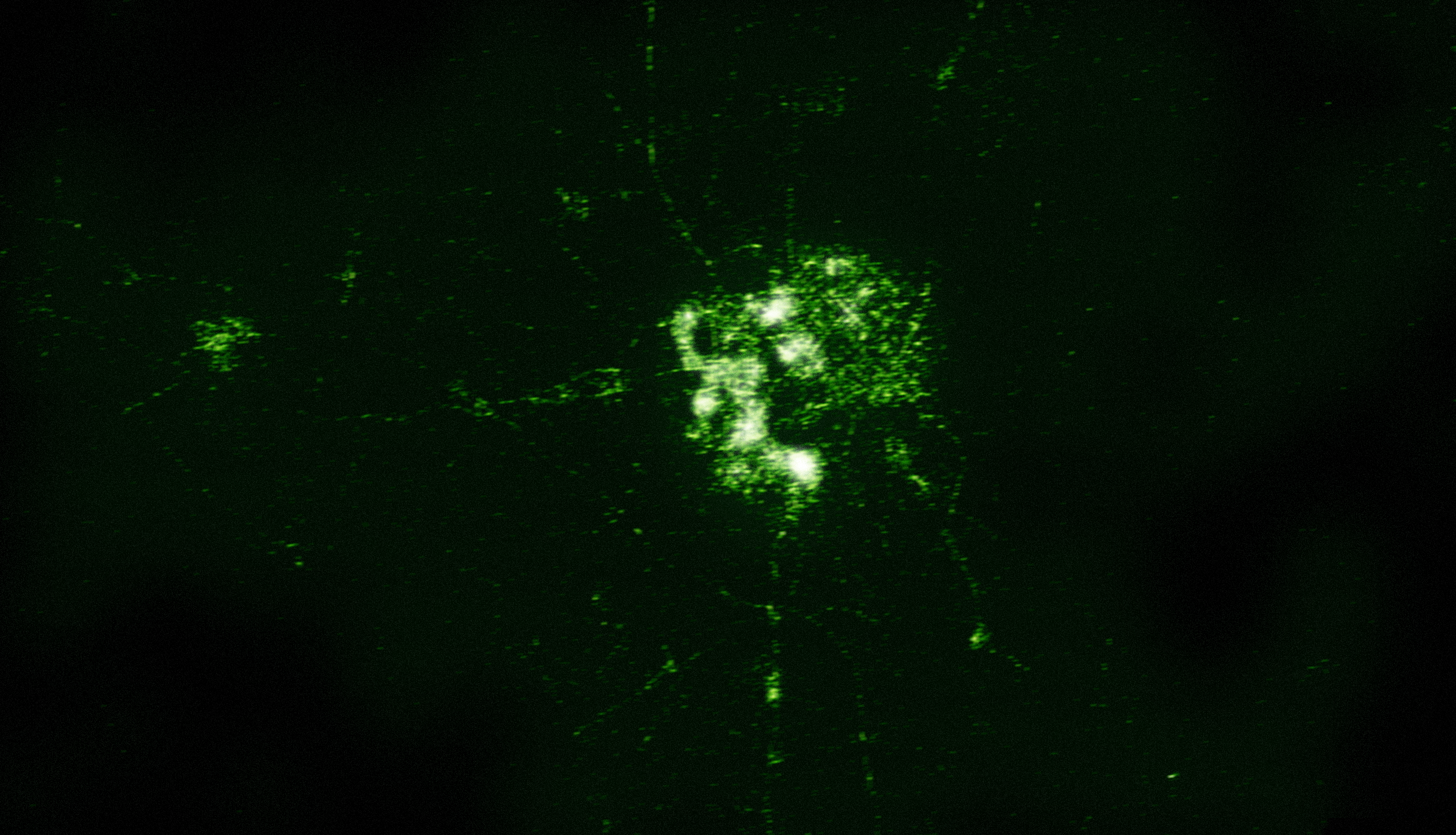
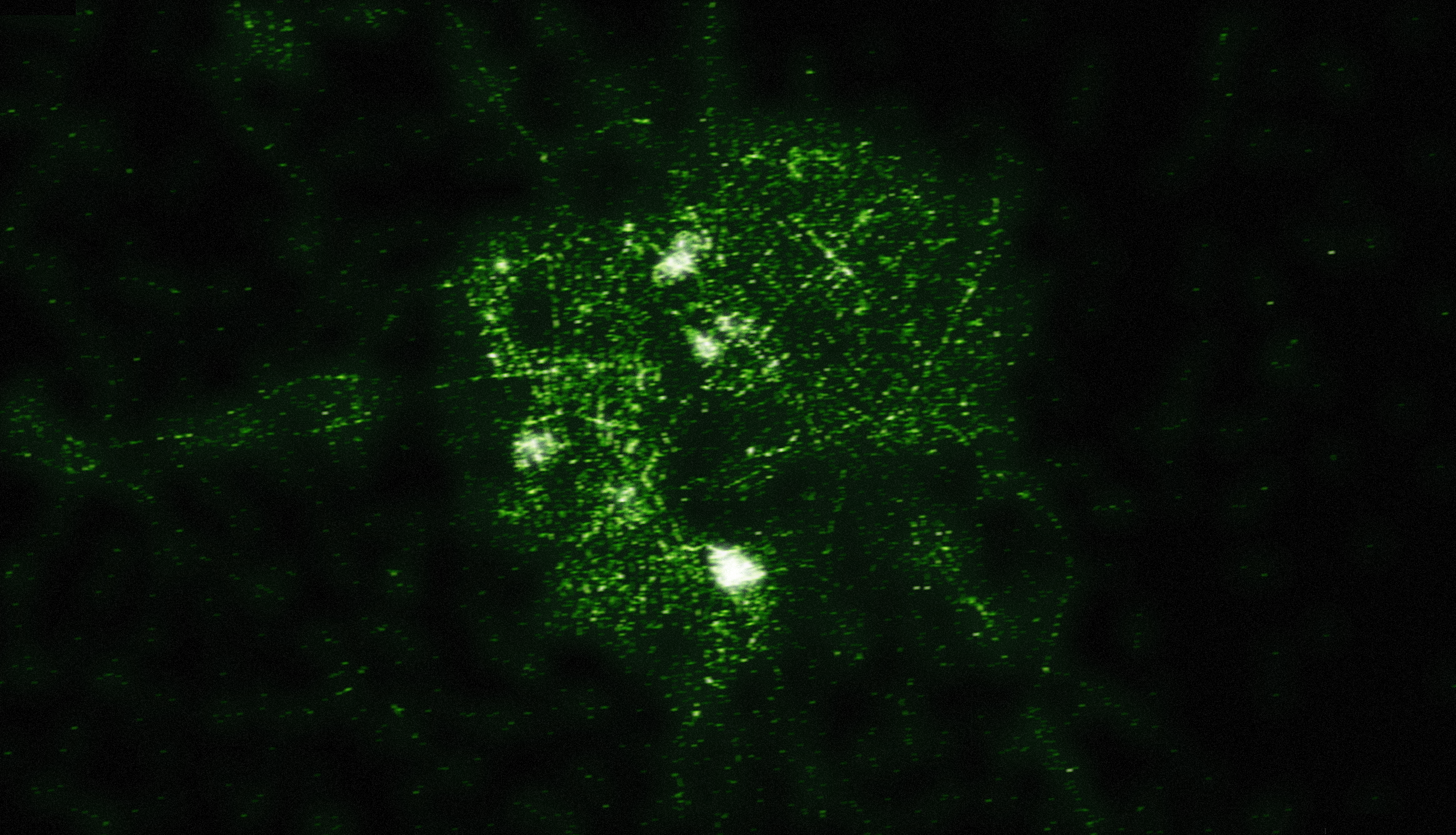
I’ve used SpatialKey to produce some heatmaps of these deaths by recreating the aesthetic of the night vision images we’ve grown so used to seeing. I downloaded the data from the compiled spreadsheet published by the Guardian. Each image has a high resolution version available (2,474 pixels by 1,419 pixels).

A view of the entire country


High resolution version

A closer look at the area of Baghdad


High resolution version

More details of Baghdad


High resolution version

Why?

These images are meant to be a bit provocative. Every tiny blurred dot represents someone dying. And yet it’s all presented in a way that everyone is comfortable with. When you glance at these images you don’t immediately think of killing. We’re so used to seeing emotionless, blurry images of rockets exploding and precision bombs targeting buildings that we disconnect the image from the reality. These are images of death. And the fact that we’re comfortable looking at them should give us pause.

Standard
Data Visualization, Maps, SpatialKey

Take the Tangent – Video of my 360|Flex Keynote

I was honored to be asked to give a keynote presentation at 360|Flex in DC last month. All the sessions were recorded, and John Wilker was gracious enough to let me post the full video of my keynote.

This keynote was a bit different. I went out on a limb a bit and talked about the experimental projects that I’ve been working on, and my belief in the importance of pursuing fun experiments to stay invigorated and passionate about our work. It covers a number of mapping and data visualization projects I’ve been playing with, but the point was really that we all need to pursue what we’re passionate about. For me that happens to be maps right now, but everyone has their own unique areas of interest.

If you’re interested in mapping work then the projects I talk about should be right up your alley. But even if you’re not a map geek, I think the presentation is still interesting and (I hope!) inspirational.

You can also see the slide deck on its own, but I think the video gives much better context to the slides.

Standard
SpatialKey

SpatialKey on ABC News in Salt Lake City

I just found out a local news story in Salt Lake City featured SpatialKey and the work we’re doing with the Ogden Police Department. Pretty sweet seeing your code come to life on TV 🙂

Here’s the video:

Standard
Art, Data Visualization, Maps

If San Francisco Crime were Elevation

I’ve been playing with different ways of representing data (see my previous night lights example) and I decided to venture into 3D representations. I’ve used a full year of crime data for San Francisco from 2009 to create these maps. The full dataset can be download from the city’s DataSF website.

A view from above

This view shows different types of crime in San Francisco viewed directly from above. The sun is shining from the east, as it would during sunrise.

top_500

I love how some of the features in these maps are pretty consistent across all the crime types, like the mountain ridge along Mission St., and how some of the features only crop up in one or two of the maps. The most unique map by far is the one for prostitution (more on that further down).

An alternate view

Here’s the same data but from a different angle, which helps show some of the differences.

UPDATE: Whoops, I screwed up originally and had a duplicate image. The original graphic showed the same map for Vandalism and Assault (both were the Vandalism map). This updated graphic has the correct map for Assault.

right_500_2

Many of the maps have peaks in the Tenderloin, which is that high area sort of in the north-east center area of the city. Some are extremely concentrated (narcotics) and some are far more spread out (vehicle theft).

My favorite map is the one for prostitution (maybe “favorite” is the wrong choice of words there). Nearly all the arrests for prostitution in San Francisco occur along what I’m calling the “Mission Mountain Ridge”, which runs up Mission St between 24th and 16th.

EDIT: I’ve been corrected. Upon closer inspection the prostitution arrests are peaking on Shotwell St. at the intersections of 19th and 17th. I’m sure the number of colorful euphemisms you can come up with that include the words “shot” and “well” are endless.

I love the way the mountain range casts a shadow over much of the city. There’s also a second peak in the Tenderloin (which I’m dubbing Mt. Loin).

prostitution_500

Drug crimes are also interesting to look at, since so much of the drug activity in San Francisco is centered in a few distinct areas. We can see Mt. Loin rising high above all the other small peaks. The second highest peak is the 16th St. BART peak.

drugs_500

There are other consistent features in these maps, in addition to Mt. Loin and the Mission Range. There’s a valley that separates the peaks in the Mission and the peaks in the Tenderloin, which is where the freeway runs (Valley 101). You’ll also notice a division in many of the maps that separates the southeast corner. That’s the Hunter’s Point Riverbed (aka the 280 freeway).

Disclaimer

These maps were generated from real data, but please don’t take them as being accurate. The data was aggregated geographically and artistically rendered. This is meant more as an art piece than an informative visualization.

Standard
Uncategorized

Nate Beck’s Birthday Surprise at 360|Flex

Payback’s a Queen!

Nate got a special surprise in the middle of his session at 360|Flex. This should teach you a) don’t fuck with me and b) don’t do a presentation on your birthday.

Happy birthday Nate!

P.S. Apologies for the shaky camera work, there were plenty of other video cameras in the room recording (including the official tripod camera), so there will be a bunch of copies of this video up soon I assume.

Standard
Uncategorized

What do you do with a giant head?

You make it vacuum your floor of course.

Inspired by this fantastic piece of work by Eric Testroete, my friend and I created my very own paper craft giant head (my buddy Todd did all the hard work of the 3D modeling and texturing). Of course, once you have such an amazing giant head, you need to figure out what the hell to do with it. And so boredom on a Friday night plus a few beers plus a giant head plus a roomba equals a magical vacuuming head!

A few more pictures of the head in action:
giant_head

gianthead2
(*not my baby)

As I figure out more shenanigans to get into with my giant head I’m sure I’ll post more ridiculous photos and videos.

Standard