A little video of my progress on tileUI. Enjoy.
Author Archives: Doug
My new project: tileUI.com
 I’ll be releasing more details later (as the date gets closer to Sept. 5), but I thought I’d release a little teaser of what I’ve been working for for the past week or so.
The basic idea is this:
PaperVision 3D + Actionscript Physics Engine = this, but in Flex/AIR
Amazon Unbox Flex app
I was browsing Amazon Unbox to try to find a movie to rent on my Tivo when I noticed that there’s a Flex app front and center that plays previews of various movies available on Unbox. Actually, the reason I noticed this was because a runtime error was thrown when I loaded the page 🙂
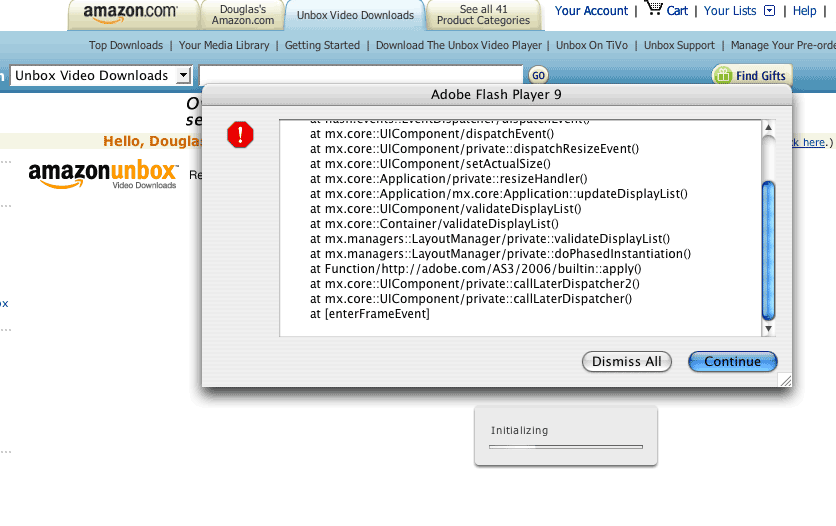
Oops.
Here’s a direct link to the swf.
ImageSnapshot class in Flex 3 SDK
There are a few new graphics classes in the Flex 3 SDK that make it easier to create image snapshots of Flex UI components. The ImageSnapshot class provides some static methods for creating snapshots of components and encoding them as PNG or JPEG images. In addition to the ImageSnapshot class, we also get the PNGEncoder, JPEGEncoder, Base64Encoder, and Base64Decoder, which were all previously in the as3corelib project.
mx.graphics.codec.JPEGEncoder
mx.graphics.codec.PNGEncoder
The JPEGEncoder and PNGEncoder classes were in the as3corelib project prior to Flex 3. They have since been rolled into the main Flex framework. Nice! They’re pretty straightforward, and they’ve been around for awhile in the as3corelib project, so they shouldn’t need much explanation.
mx.graphics.codec.IImageEncoder
The IImageEncoder interface defines an interface for a class that encodes a BitmapData object or the raw bytes of a Bitmap into a new encoded ByteArray. The two classes that implement this interface are PNGEncoder and JPEGEncoder. If you were to write your own image encoders you could implement this interface and then you could pass your custom encoder to ImageSnapshot.captureImage() (read below for more on that).
mx.graphics.ImageSnapshot
The ImageSnapshot class is a new addition to the Flex SDK that simplifies the process of capturing an image from a Flex UI control. This is a task that is often performed, I can think of a bunch of examples right off the top of my head where I’ve had to do this. A live reflection class is one candidate to use this new helper class. I have a feeling a big use of this class is going to be saving image snapshots to the user’s computer in an AIR application. And another use-case that I recently dealt with is converting a Flex UI component to a Base 64 encoded image (see my previous post).
When I needed to get a Base64-encoded string of a given Flex UI component I did something like this:
private function getBase64String(component:UIComponent):String) {
	var bitmapData:BitmapData = new BitmapData(component.width, component.height, true, 0xffffff);
	bitmapData.draw(component);

	var bytes:ByteArray = PNGEncoder.encode(bitmapData);

	var b64encoder:Base64Encoder = new Base64Encoder();
	b64encoder.encodeBytes(bytes);

	var b64String:String = b64encoder.flush();

	return b64String;
}
But now we have a much easier way. The ImageSnapshot class has a few static methods that we can use. We get:
captureBitmapData
This is the utility function that returns a BitmapData object. This basically saves us a line of code and simplifies the call. Dimensions are capped at 2880 pixels for each side.
captureImage
This returns an ImageSnapshot object. That doesn’t get us all that much, but there are a few pretty cool things. We can pass captureImage a parameter that tells it how to encode the image. PNGEncoder and JPEGEncoder have been rolled into the framework now, so we can pass in either of those and it will encode the image as a PNG or a JPEG.
Once we get the ImageSnapshot object that the static method returns then we can access the byte data of the encoded image with the data property. Then we could pass the JPEG or PNG encoded image to a server to save the file, or if you’re writing an AIR application you could save the file to the hard drive (or drop it onto the clipboard).
encodeImageAsBase64
This function takes an ImageSnapshot object and encodes it as a Base 64 string. Easy enough.
So to go back to the sample code above, now we can generate a Base 64 encoded string like this:
private function getBase64String(component:UIComponent):String) {
	var snapshot:ImageSnapshot = ImageSnapshot.captureImage(component);
	var b64String:String = ImageSnapshot.encodeImageAsBase64(snapshot);

	return b64String;
}
and if you’re too good for three lines of code:
private function getBase64String(component:UIComponent):String) {
	return ImageSnapshot.encodeImageAsBase64(ImageSnapshot.captureImage(component));
}
Bypassing the 2,880 pixel limit
Flash Player has a limitation of only allowing a single bitmap object to have a max width or height of 2,880 pixels. I’ve never run into this problem, but I guess people with massive monitors can have a problem. The ImageSnapshot class does some fancy footwork in the captureImage method that allows you to generate an encoded JPEG or PNG snapshot that is larger than 2,880 pixels. Basically it creates multiple BitmapData objects and stitches them together to form one final ByteArray. Look at the source code for ImageSnapshot and check out the captureAll method.
This gets around the 2,880 pixel limit, but there’s a 256 meg size limit on a single ByteArray object. From the documentation in the ImageSnapshot class: “This ByteArray is limited to around 256MB so scaled images with an area equivalent to about 8192×8192 will result in out of memory errors.”
So nothing groundbreaking here, but we get to save some boilerplate code that we used to have to write to generate a BitmapData object from a Flex UI object, or to generate the bytes of an encoded JPEG or PNG image. I’m guessing a big reason for Adobe including this in Flex 3 is to make it easier to save JPEG or PNG snapshots of charts in an AIR application.
Compare Flex SDK version 2.0.1 with version 3
UPDATE: Well shit, turns out that posting the source of the almost-open-source-but-not-quite-yet Flex SDK is a no-no for now. I assume once the Flex 3 SDK officially goes open source this will be OK, but for now I’ve been asked by Adobe to take it down. As you say master.
I’ve set up a project using Trac (if you don’t know what trac is read here) that allows you to compare the source code of the new beta release of the Flex 3 SDK with the previous Flex SDK 2.0.1 version. This lets you browse all the changes that were made and visually see the differences. I find this very useful when trying to analyze the new release and figure out what the new additions and changes are.
Here’s a link to the main Trac website.
You can view the entire changeset from version 2.0.1 to version 3 here. (Warning: it’s pretty big so it might take a bit to load).
If anyone from Adobe doesn’t like this and wants me to take it down just let me know. I think it’s valuable for the development community, but if you’ve got a legal fever and the only remedy is to yell at me, then I’ll remove it. Email me here: doug@dougmccune.com.


My thoughts on Flex 3 features – Part 3
This post discusses the features Ted Patrick blogged on Wednesday: the Advanced DataGrid component, Deep Linking, Resource Bundles for localization, and the Flex Component Kit for Flash CS3.
Advanced DataGrid (I would’ve called it SuperDataGrid)
This is basically what the community has come to call a “TreeGrid”, plus the addition of more control over the headers, and summary rows and cells. It’s certainly a component that has has been asked for like mad. I’ve seen a few versions of a TreeGrid component out there (like the one in FlexLib). As far as I know this component’s a hard one to get right, I know the FlexLib version has quite a few issues, so it’s good to see that Adobe’s been working on a solid version themselves. I’ll be interested to dive in and see how they did it (ie I assume DataGrid as the base, but do they use the Tree control? or did they cook up an independent Tree control for use within the DataGrid? Is the original DataGrid component untouched?). I’ve never seen anyone add summary rows to the DataGrid component, but I’ve heard people request this a lot, so I’m sure this will get a lot of use as well.
I’ve said before that the DataGrid stuff doesn’t get me excited. This is a component lots of people have wanted, so that’s cool, and I bet I’ll find a use for it (like in my AS code analyzer app for sure), but if this never existed I wouldn’t cry myself to sleep. It’s a cool and requested component, but I mean, that’s what we get for UI components? Two layout components and a better DataGrid? I know a couple people on the SDK team, they’re smart, they can make really cool shit (I mean, the Flex 2 SDK was frickin amazing). This is what they’ve been spending their time on since the release of the Flex 2 SDK? Bugfixes and a DataGrid? Being a component developer on the Flex 2 SDK seems like it would’ve rocked. Flex 3 SDK? mm, not so much.
Granted, we’ve had some good components come out of Adobe (or Adobe Consulting) since the release of Flex 2, like the Scheduling Framework, Auto-complete TextInput, Docking Toolbar. And Ely Greenfield has put out mindblowing stuff. So in my ideal bountiful-component world? Take Ely and get him working with Alex Uhlmann and the rest of the Adobe Consulting peeps to crank out components. The amount of stuff they could put out in a year would be amazing. Ely, you hear that? Enough management and planning, stop writing specs, take a pay cut and demotion and start writing code again!
Deep Linking
That’s cool, I don’t know if any of the apps I write will use deep linking, but it’s good that it’s available and easy to use. But most of the discussion around deep linking is about SEO. An important part of deep linking support is that Flex/Flash apps need the ability to present multiple unique URLs to search engines for them to index. The inclusion of deep linking on its own doesn’t address the SEO issue. So just because you might be able to have unique URLs for the different parts of your Flex app doesn’t mean that Google is going to include your URLs in its index. Now I’m not saying that Adobe doesn’t know this, that link at the beginning of the paragraph is Matt Chotin asking the Flex community if deep-linking on its own, without SEO, is still valuable. So clearly Adobe has decided that even though there is still no solution for SEO with Flex apps, they’re going to support deep linking. That’s good and all, but what would have made this a show-stopper is if the announcement was that Adobe had worked with Google to make Flex apps indexable. Now that would be impressive.
Resource Bundles and Runtime Localization
I know this has been often asked for. Basically at every public Q&A session with people on the Flex team that I’ve ever been to (Apollo Camp, 360 Flex, some of the silvafug meetings) someone has asked about localization and multiple language support. So the demand is clearly out there. I don’t have any experience trying to make apps that support multiple languages (what, not everyone speaks English? really?). So I can’t say that this eases a distinct pain of mine, but I know it’s important to a lot of people, so kudos to Adobe for getting it rolled out. It doesn’t make Flex 3 stand out in my book, but I know this feature alone will make the upgrade worthwhile for some.
Flex Component Kit for Flash CS3
This was sort of mentioned in Ted’s previous post when he talked about skinning integration with other CS3 apps. I haven’t tried this out, and I actually have a pretty pessimistic view whenever I hear talk about cross-product integration. But if this works I will probably do a lot more skinning in Flash. A personal aside, I started working with Flash before I started working with Illustrator. I’m not a great graphic designer, but I enjoy design and skinning and all that. I actually like the simplicity of the Flash vector drawing tools. When I skin apps (or even make t-shirts, or stickers, or whatever) I often draw my graphics directly in Flash. Illustrator lovers will probably gasp at the fact that I like drawing in Flash more, but hey, I’m a simple guy. So since most of the vector graphics work I do is already in Flash, that means I can designs skins using the app I’m most comfortably drawing with (as opposed to Fireworks). I don’t do enough skinning work to make this too important, but if the Flex Component Kit works well (I haven’t tried it yet) then this might be pretty sweet for me.
Summary
This feature set is all about the Advanced DataGrid component. This is a component a lot of people have wanted. But I’m about as excited about this one as I was about the original DataGrid or Tree components in the original Flex 2 SDK (that is to say, not excited much at all). I think the main reason I’m so down on the Advanced DataGrid is because I saw Flex 3 as an opportunity for a whole set of new component toys to play with. And so I wonder how the same team of programmers who put together the first Flex 2 SDK can put out an update that includes a whopping 1 new UI component and 2 layout components. This does not include updates to the charting components that will also be included, I have no idea what those will be, maybe I’ll be blown away (although I’m only expecting minor updates to existing charting components).
The announcement that Ted made today about Flex Framework caching on the client is more exciting to me than this feature set. I’ll try to write up my thoughts on that tomorrow when I get time. I think it’s an important feature (although not as important as the Profiler). But I’ve never seen the 500-700k footprint of a Flex app be a show stopper. But anything to get that large SWF size down will give Flex haters a bit less to argue about.
Will Flash Lite soon support Flash Player 9/Flex?
[UPDATE: OK, I was dead-wrong on this one. Ted was referring to the ability for Flash Player on the client machine to cache versions of the Flex SDK, so your Flex app can be decoupled from the entire weight of the framework, and if the user has already loaded a Flex app they don’t have to re-download a full 500k (or more) swf when they view your app. Read Ted’s description here.]
This is complete speculation, but it’s the only way I can read the following comment posted on Ted Patrick’s blog:
This feature will forever alter how Flex is deployed and I am pretty confident that you will be shocked. Flex is about to become much more distributed. 🙂
I have my fingers crossed that what this is going to mean is that the next version of Flash Lite is going to support Flash Player 9 and that Adobe’s Device Central is going to give us sweet Flex integration and mobile templates so we can develop Flex apps for phones.
Am I reading too much into that sentence? I guess I’ll find out tomorrow.
My thoughts on Flex 3 features – Part 2

This post addresses the code enhancement features Ted blogged about today. Now we’re getting into some stuff that’s worthwhile.
Compilation
This is huge to me, it’s one of those things that made me hate Flex Builder 2. It fixes a problem that has led me to curse at my computer. So I’m really happy incremental code compilation is coming, but this is something that should have always been in the product (man, I’m harsh today, huh?). Recently I’ve been working on a pretty large Flex app. We’ve got about 8 different MXML apps in the project, each representing a different prototype of the same general application with slight variations. As your app grows, and especially if you have multiple MXML applications, it takes longer and longer to do a build. Yesterday I was in a time crunch to get some updates for this app rolled out. But every time I needed to do a new build Flex Builder would take what seemed like an eternity (I don’t know, maybe not eternity, but it seemed really long). And Eclipse’s memory usage skyrocketed up to well over a gig of RAM. I only made changes in a few classes, and I only wanted to test one of the MXML apps out of the 8 that were in the project. But every build had to recompile each MXML app (yeah, I know you can remove MXML apps from the project’s preferences, but that’s a hassle to always do). So anyway, this will definitely save me time. And when you’re billing by the hour, a minute or two saved each time you build your app adds up to a lot of dollars.
Language Intelligence
I can’t comment on this because I have no idea what implications this has for writing code. He mentions the features this enables (refactoring, code outline, etc), so I’ll cover those features on their own.
Refactoring
This is good, and a lot of people seem to think this is the most important thing in this release (judging by blog reactions and the oohs and aahs when it’s demoed in public). I mean, this is cool, it saves you time when you need to refactor. But I’ve done some pretty intense refactoring and I gotta say that refactoring’s not on my top five list of things I want to see in Flex 3. It’s great that it’s there, and I’m happy to take advantage of it, but I don’t see this as one of the top features in this release. I might totally be the exception here.
Class Outline
I don’t care. I’ve never used the application Outline view, I don’t think I’ll ever use the Class Outline view. It shows all the imports in a class? So? They’re all at the top of the class anyway. It shows all the function and variables? I don’t care, I can control-click on anything I see in a class and jump to where it’s declared, that’s more useful to me.
Code Search
This I find useful. I have often found myself doing a search within a class for every reference to a specific variable or function. I’d almost like to see this code search panel automatically open every time I control-click on a variable or function name. This doesn’t solve a huge pain for me, but I’m sure I’ll use it.
Profiler
THIS IS HUGE. This is without a doubt the single best feature out of this set. Maybe of the entire Flex 3 release (obviously I have to wait to hear what else is included). HUGE. People say they want refactoring… fuck refactoring, I want the profiler. There have been countless times in my Flex development that I’ve wanted this. Every Flex app I’ve ever made could have benefited from having this profiler. This will allow Flex apps to get much bigger and much more complex. We’ll get much more graphic-intensive but still usable apps because of this. When you build a large Flex app you quickly start hitting performance issues. AS3 is damn fast for small stuff, but using the Flex Framework and very complex layouts means the player is doing a ton of layout calculations for any screen movement. Then when you add in component creation and you start creating references to components that you think are being disposed of, but turns out they’re not and the GC doesn’t free those components… it all goes to hell. Very large, complex Flex apps running for days almost always get slower and start eating up more RAM. Making your app GC friendly is difficult when you start building big apps. The profiler will be an essential tool for any developer working on a Flex app of any large size.
Module Support
That’s cool, whatever. I’m still tired from my excitement over the profiler, so these next features aren’t going to really get much love from me.
Multiple SDK Support
I don’t really see this as being very important. I guess the idea is that you can have developers with different SDK versions working on the same Flex app? But really? I don’t see that happening. One thing I do see that’s useful is when a new hotfix or update comes out, this will let you take an existing Flex app and testdrive it with the new update to see if there are any issues. If there are you can easily switch back to using the old version until you figure out how to migrate. That’s useful I guess.
Summary
PROFILER PROFILER PROFILER. This is worth getting the upgrade for. The only other thing in this feature set that I really want is the incremental compilation, but that will just make me dislike Flex Builder less. The Profiler will actually make me drool.
Tomorrow Ted’s going to write about the new components in the SDK. I want new components! But I think this is going to be less than exciting. We’re going to see an enhanced DataGrid, and probably other enhancements to the list-based controls. I hate the DataGrid. I understand why it’s really important to Adobe and why a lot of enterprise business apps need a powerful DataGrid control. But it’s so damn boring. Seriously people, come up with a more exciting way to show your data, don’t just drop cells into a grid. I know you love excel, but we’re working with a platform that can display data in all sorts of cool ways. Enough with the DataGrid.
I would love to see new UI components, but I don’t think we’re getting anything new (I’m hoping I’m wrong tomorrow). He also hints at SQL support within AS3, but don’t we already have an open-source project to do that? I think the framework updates are what I was most excited about when I first thought about Flex 3, only to find out that we aren’t getting a new set of components, just a few upgrades to the boring components. But we’ll see tomorrow.
My amped-up excitement for the profiler has worn off now, but seriously, the Profiler is cool. Like in terms of adding up to a BJ in my mind? Flex 3 is getting closer.
My thoughts on Flex 3 features – Part 1
Seeing how I bashed on what I saw as over-hyped PR about the upcoming Flex 3 beta, I figured I would post my thoughts on the new features that Ted Patrick has been showing. Someone asked me to write about whether any of the new Flex 3 features “add up to a BJ in my mind.” Hence the graphic on the right. I’ll try to make that judgment once I hear more about Flex 3. For now, this post corresponds with the first post Ted did on his blog about the Developer/Designer enhancements in Flex 3.
Skin Importing
This is nice, it looks like if you create a single SWF and if you name your assets correctly they’ll get automagically correlated with the Flex components they’re supposed to skin (ie AccordionHeader_disabledSkin gets mapped to the disabledSkin style of the AccordionHeader selector). I assume this is simply a matter of parsing the symbol names in your swf, and not a more magical integration with Flash CS3, but I don’t know. So yeah, this is kinda cool, saves you some time. I’m not too excited but that might just be because I haven’t done an awful lot of custom skinning.
Design View Zoom/Pan
I don’t care. I rarely use design view, and when I do the object snapping always seems to work well enough for me to align stuff correctly. But again, I’m almost never in design view except to check out CSS styling and very basic layouts.
Design Mode support for ItemRenderers
This is pretty hot if you use design view. I question how well this will work with complex custom item renderers. I have a hard enough time trying to get my custom components to draw themselves in design view at all, so I have some serious doubts about whether this will work with complex ItemRenderer components. But I’m sure it will be helpful for simple inline ItemRenderers. Again, I rarely use Design View, so I’m not super excited about this, but I can see why people would be (especially considering the number of ItemRenderer questions that get posted to flexcoders). Some of the most common problems people have deal with data binding in ItemRenderers. If this gives you visual feedback about whether you’ve wired up your data binding correctly in your ItemRenderer then I think it will be useful to a lot of people.
Advanced Constraints
I don’t even know what this means. I’m really looking forward to new components in the SDK, but these don’t get me too excited (that might just because I don’t understand what they really are).
CS3 Suite integration
This is big… if it works. I’ve seen the demo of Fireworks CS3 to Flex skinning and that’s pretty cool. I have no idea what the Photoshop or Illustrator integration means. Not to be overly pessimistic but I have a feeling the answer is that the integration isn’t going to work well enough to live up to the hype. That goes for the non-Fireworks products. The Fireworks skinning integration looks like it might actually work well enough to use on a daily basis. I’ve never been a Fireworks user, but this might be enough to get me to convert.
CSS Outline
I don’t care. I’ve never used the outline view for AS3 classes, I don’t think I’m going to use the outline view for CSS. It’s not like looking at a CSS file is difficult, it presents the information in an almost identical way as the CSS outline view.
CSS Design View
Fuck yeah. This is good. This is something I’ve wanted for a long time. So far I’ve taken two approaches to writing CSS styles for a Flex app.
- Option 1: make changes in a CSS file, save, switch over to my MXML app, switch into Design View (because I only go into Design View for CSS checking), click the Refresh button, find the component I was just styling, check it, then go back to the CSS file and make some minor adjustments.
- Option 2: open up the Flex Style Explorer app and do all my styling there. Then copy/paste the relevant CSS blocks into my CSS file. I remember one day the style explorer site was down for a bit and I didn’t know what to do. I think I got drunk instead of doing Flex work.
Now that all can go away. Thank God. My biggest concern is about whether this will work with custom components. I really want to be able to use CSS Design View for custom styles defined in custom components. Please.
Flex 3 SDK Skinning/Style Enhancements
Nothing here really gets me excited. We get some changes in the programmatic skinning of ProgressBar, DataGrid, and Panel. Maybe I’ve just never tried hard to skin these components and run into any problems.
Summary
For me, CSS Design View is the standout of this group. This will certainly save me time. Nothing else really jumps out at me. The Fireworks skinning integration has the potential to make skinning a Flex app a hell of a lot easier, but just in terms of my personal interest I don’t really care too much.
These features are nice, but this stuff alone probably wouldn’t get me to pay any money for the upgrade. Maybe that’s because I don’t do an awful lot of work with designers who don’t code. Or maybe it’s because a lot of the work I do is more in the custom component realm than the overall app development realm. Or maybe I just don’t like pretty things.